Access Token in localStorage Is Not an Auth Strategy
localStorage makes bearer tokens easy to persist and easy for malicious JavaScript to steal. Here is what memory and HttpOnly cookies actually change.
This entry is part 2 of 5 in
Auth Is More Than Login
A practical series on XSS, CSRF, JWTs, sessions, refresh tokens, and the auth rules people skip.
Browse series posts
- 1Your Auth Is Not Safer Because You Used JWTs
- 2Access Token in localStorage Is Not an Auth Strategy
2 posts are available now. The planned series has 5 parts.
On this page
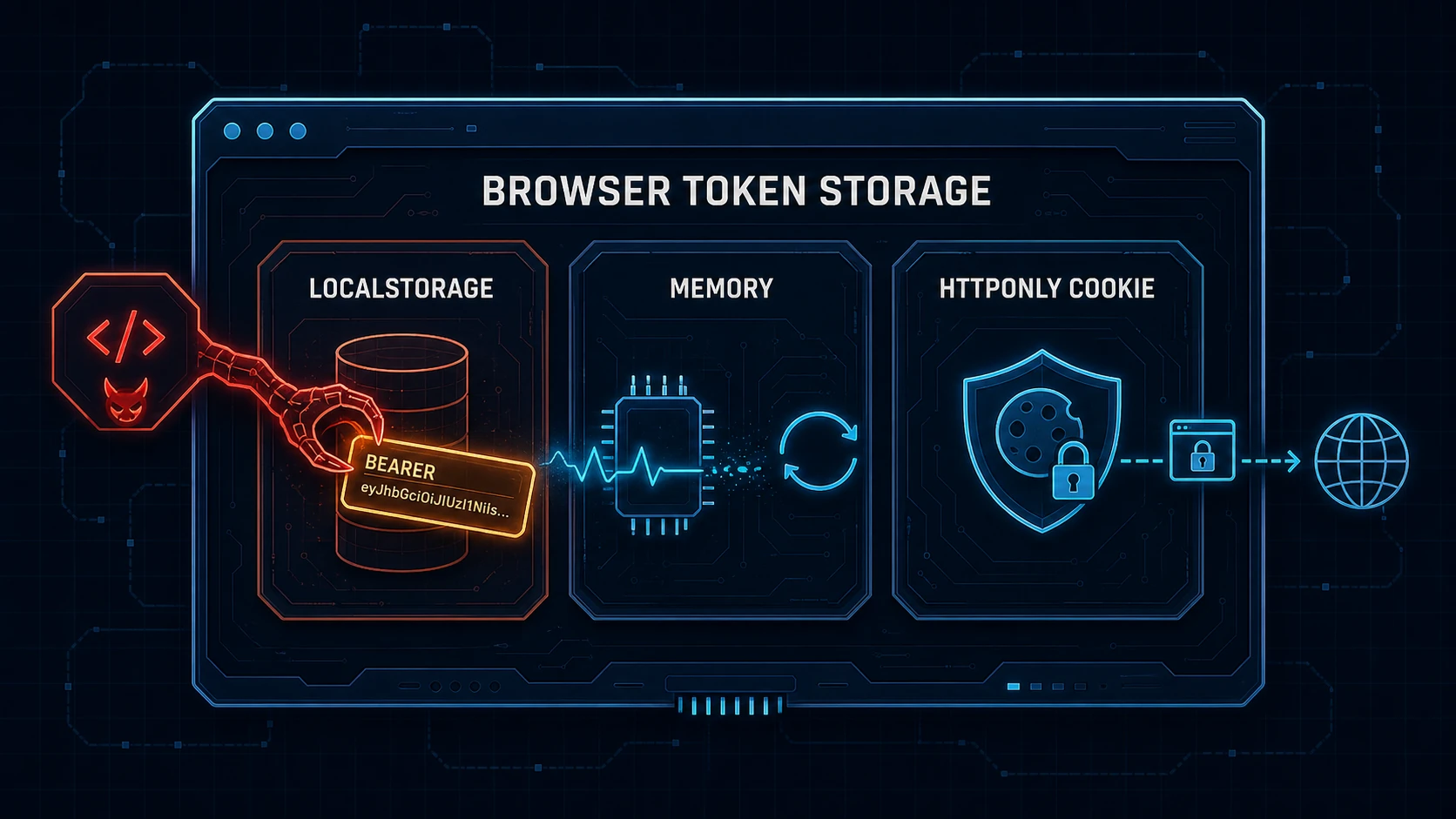
localStorage is easy. That is exactly why it keeps showing up in auth systems that need more care than "save token, attach bearer header, ship."
One line stores the access token. One line gets it back after a reload. Every frontend tutorial can move on to the interesting screen before anyone asks what happens when JavaScript on that origin turns hostile.
Convenience is not a security model. If malicious JavaScript can read a bearer token, it can send that token somewhere else. The API will not know that the next request came from an attacker's laptop instead of the browser that originally logged in.
Easy Storage, Expensive Assumption
I understand why developers reach for localStorage. Its API is simple, the value survives page reloads and browser restarts, and adding an Authorization header becomes almost embarrassingly easy.
That persistence feels like a feature because the user stays signed in. It is also the part that turns a brief script execution into a credential that may remain useful long after the user closes the compromised page.
The familiar version looks like this:
const TOKEN_KEY = "access_token";

export function saveAccessToken(token: string) {
  localStorage.setItem(TOKEN_KEY, token);
}

export async function apiFetch(path: string, options: RequestInit = {}) {
  const headers = new Headers(options.headers);
  const token = localStorage.getItem(TOKEN_KEY);

  if (token) headers.set("Authorization", `Bearer ${token}`);

  return fetch(`/api${path}`, { ...options, headers });
}
The code works. That is the problem. As OWASP warns, every script running on the same origin gets the same storage API. Your bundle can call localStorage.getItem(TOKEN_KEY), but so can an injected script, a compromised dependency, or a third-party script that received more trust than it deserved.
The browser does not label one script "the real app" and another "the suspicious one." Same origin, same access.
What XSS Actually Gets
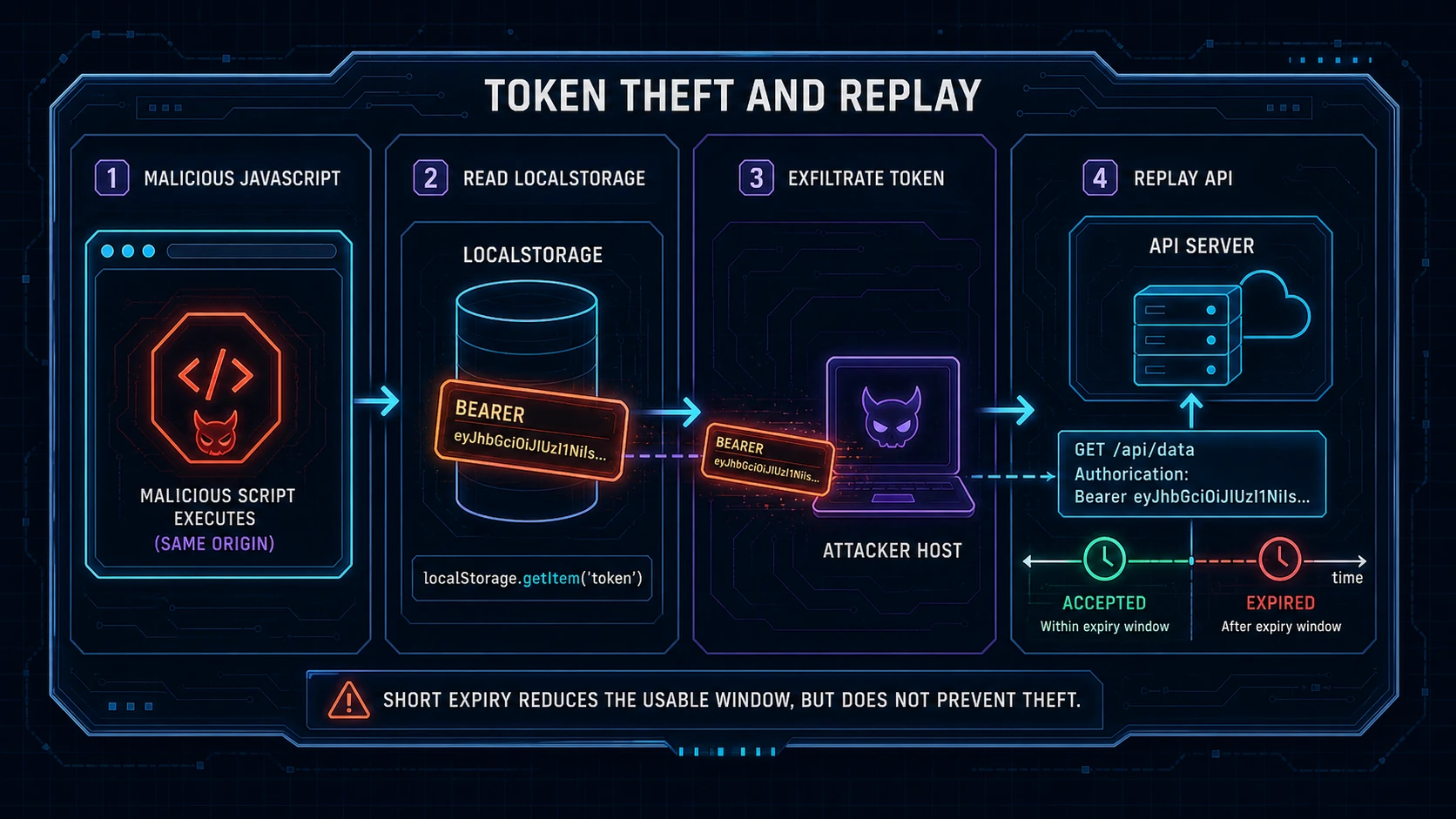
There are four different actions that auth conversations often collapse into the word "token."
- Decoding reads the contents of an encoded token. A normal signed JWT is not secret just because its payload looks like alphabet soup.
- Stealing copies the credential out of the browser and sends it to an attacker.
- Replaying presents that stolen bearer credential from another client while it is still valid.
- Acting through the browser leaves the credential in place and makes authenticated requests from the victim's active page.
localStorage exposes a bearer access token to theft and replay by same-origin JavaScript. A JWT can also be decoded. Either way, the value can be exfiltrated for another machine to use until expiry or rejection.
This is why a seven-day access token in localStorage makes me nervous. One successful theft can become seven days of access, even after the vulnerable tab disappears. The token's signature may be perfect. It is now perfectly proving that the attacker possesses a valid credential.
Short expiry helps, but it solves a smaller problem than people claim. A 10-minute token gives the attacker less time than a seven-day token. It does not stop the theft, and 10 minutes is plenty of time to download data or change an account.
Short expiry is damage control, not an XSS defence.
Memory Changes Persistence, Not Active XSS
For a browser app that must send bearer headers, I prefer keeping the access token in memory. A module-scoped variable is enough to establish the important property: a reload clears it, and there is no persistent browser storage entry waiting for the next script execution.
Here is the same request helper with that boundary:
let accessToken: string | null = null;

export function setAccessToken(token: string | null) {
  accessToken = token;
}

export async function apiFetch(path: string, options: RequestInit = {}) {
  const headers = new Headers(options.headers);

  if (accessToken) headers.set("Authorization", `Bearer ${accessToken}`);

  return fetch(`/api${path}`, { ...options, headers });
}
This is not a magical JavaScript vault. While malicious code is active, it may intercept requests, call application functions, or use the page to perform authenticated actions. Depending on how the app exposes and moves the token, it may still capture the value at runtime.
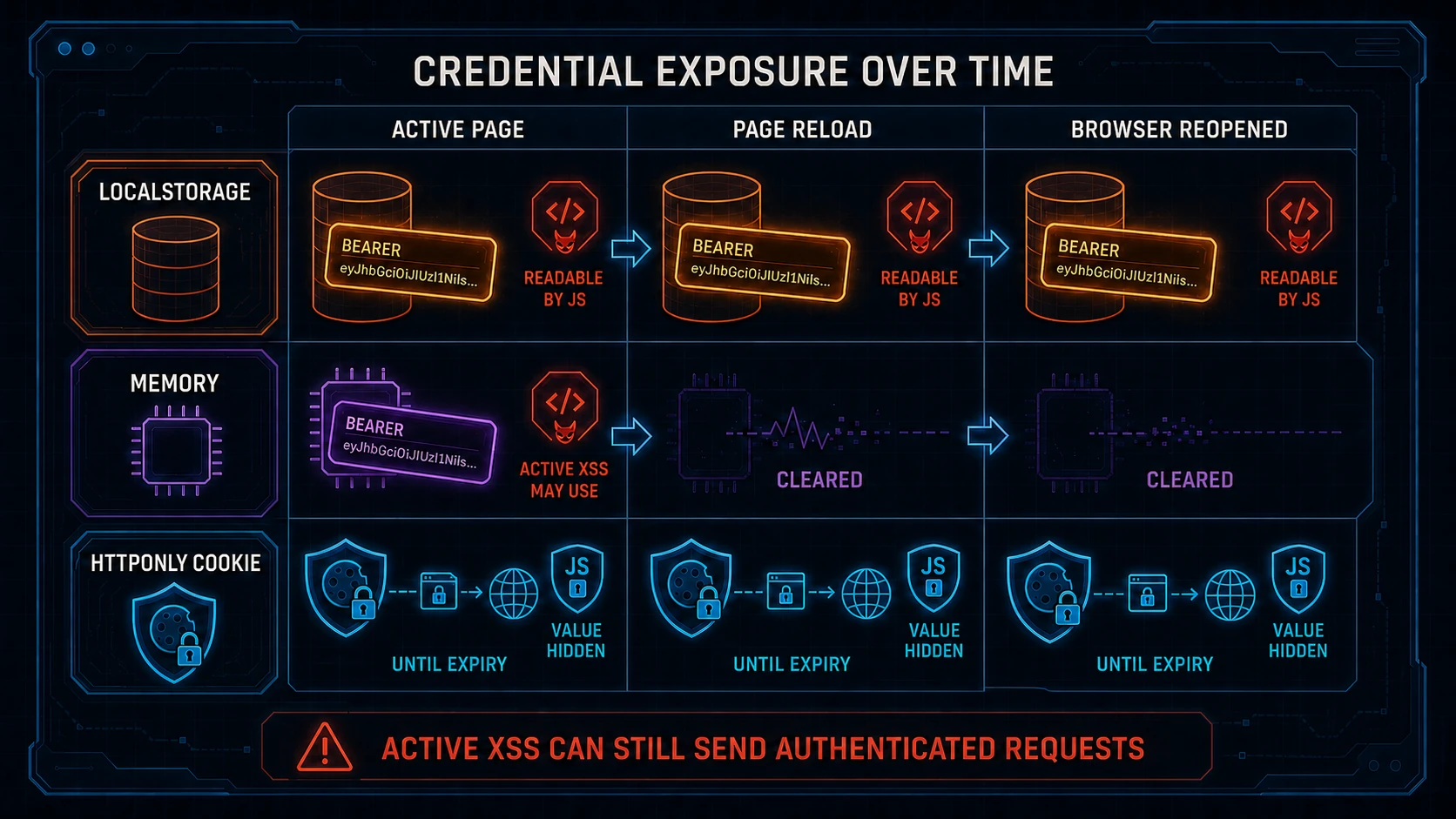
Memory changes persistence. The attacker no longer gets a stable localStorage key that survives reloads and browser restarts. When the page's JavaScript context disappears, the in-memory value disappears with it.
That narrower exposure is worth having. It just should not be advertised as "XSS solved," because XSS is still running inside the authenticated application.
HttpOnly Changes the Attack
An HttpOnly cookie moves the credential outside JavaScript's direct reach. The browser can attach it to matching requests, but document.cookie cannot return its value.
That removes the simple read-copy-replay path. Malicious JavaScript cannot grab the cookie value through the normal cookie API and paste it into an Authorization header on another machine.
It does not make XSS harmless. Code executing on the application's origin can still send requests to the application, and the browser may attach the cookie automatically. If the page can read the response, the malicious code may read it too. The attacker can act through the victim's browser without ever learning the credential.
So an HttpOnly cookie changes the threat. It makes credential extraction harder, but it does not stop hostile code from using an already authenticated page.
Cookie-authenticated routes also need a CSRF policy. Part three covers that policy, because pretending cookies are a free security upgrade would be swapping one incomplete auth story for another.
The Storage Decision Table
No browser storage choice defeats active XSS. The useful question is which capabilities remain available to malicious code and how long they remain available.
| Storage choice | Read through a browser storage API? | Survives reload? | Can active XSS make authenticated requests? | Main cost |
|---|
| #default
localStorageYesYesYesA stolen bearer token can be replayed elsewhere until rejected | | | | |
| JavaScript memory | No persistent storage entry | No | Yes | Reloads, new tabs, and crashes lose the token |
| HttpOnly cookie | No | Yes, until expiry | Yes | The browser sends it automatically, so the app needs a deliberate cookie and CSRF policy |
I would not choose based on which row contains a "No." I would choose based on the failure I am trying to contain.
If the app needs a bearer token in an Authorization header, memory reduces persistent exposure. If the browser and backend can use cookie authentication, HttpOnly blocks direct JavaScript access to the credential. localStorage optimises reload convenience while accepting the cleanest theft path.
That is a trade I rarely want for authentication.
The Minimum Bar I Would Accept
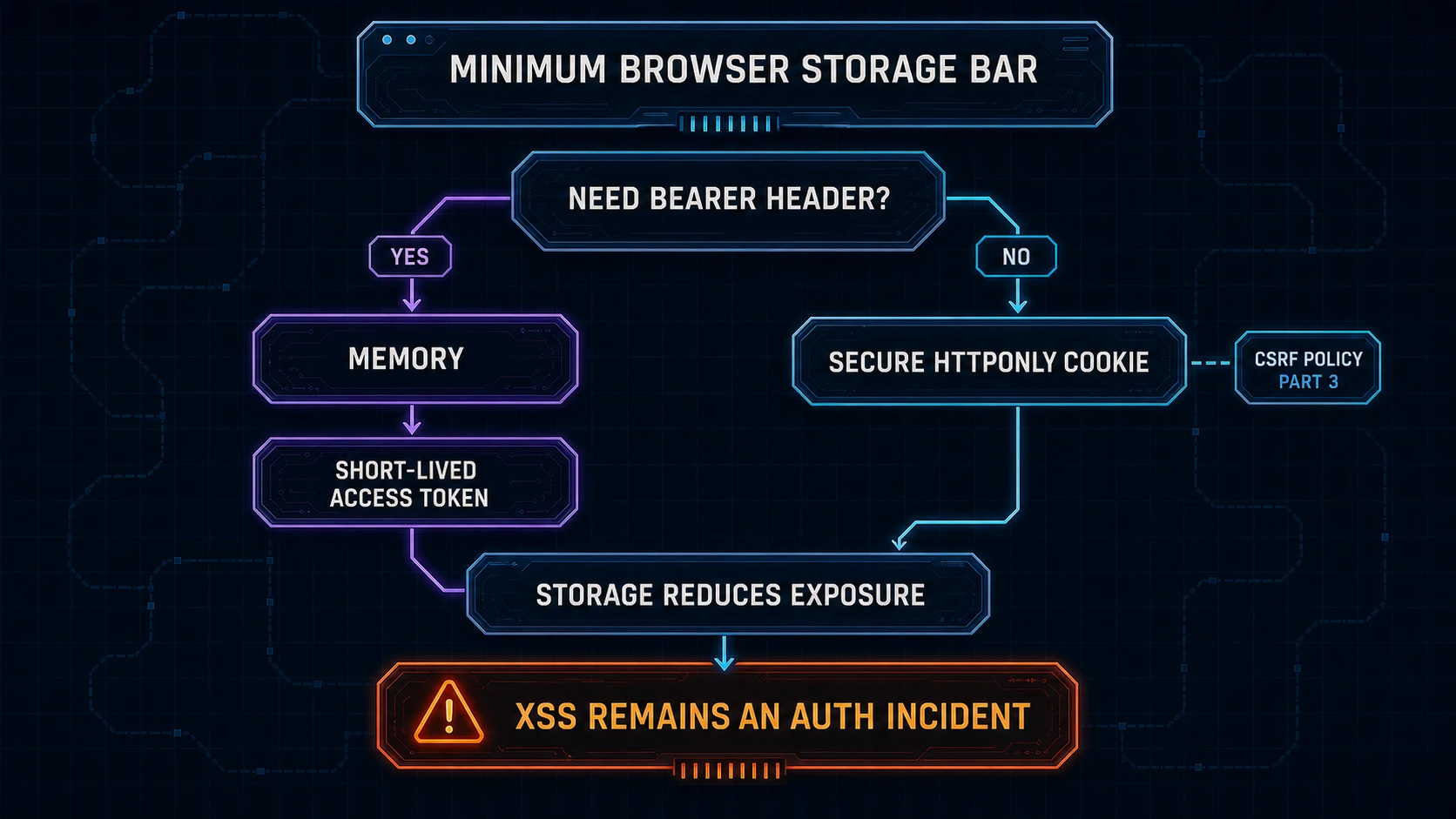
For a conventional first-party web application, my default is an opaque session or credential in a Secure, HttpOnly cookie. Mature framework support is a feature, not an admission that the architecture is boring.
For a SPA that genuinely needs bearer headers, I keep the access token in memory and make it short-lived. I usually start the conversation around 5 to 15 minutes, then adjust it based on what the token can access and how quickly the system can reject compromised credentials.
The minimum bar is simple:
- Do not put a long-lived bearer access token in
localStorageby default. - Keep browser access tokens short-lived, but treat expiry as damage reduction.
- Prefer JavaScript memory when the frontend must own a bearer token.
- Prefer
Secure,HttpOnlycookies when the browser can let the server own the credential boundary. - Treat any confirmed XSS as an auth incident, regardless of storage choice.
Short-lived access tokens usually need a renewal mechanism. Part five covers refresh rotation and reuse detection. Moving a longer-lived renewal credential into localStorage would only recreate the original problem with a more valuable token.
The Honest Part
Avoiding persistent JavaScript-readable storage costs something. An in-memory token disappears on reload. Each tab has its own JavaScript context. Restoring a signed-in session requires coordination with the backend, and that flow can flash loading states or fail when the network is having a bad day.
Multi-tab behaviour also needs a decision. Broadcasting the access token between tabs recreates more exposure. Letting every tab restore its own access can create duplicate requests and awkward timing. There is no three-line replacement with all of localStorage's convenience and none of its risk.
Cookies have their own operational details: scope, expiry, cross-origin deployments, browser rules, and CSRF protections. Memory-based bearer tokens still require careful renewal. None of this is as pleasant as calling setItem once and forgetting about it.
Security controls often spend convenience to reduce the size of a failure. That is the bill here.
My Recommendation
Do not use localStorage as the default home for access tokens just because the login tutorial did. Use it only after explicitly accepting that any malicious same-origin JavaScript can turn a browser compromise into a portable bearer credential.
Use an HttpOnly cookie for a conventional first-party web app when you can. Use memory for an access token when your SPA must attach bearer headers. Keep the token lifetime short in both designs, and remember that neither choice repairs XSS.
The goal is not to find a browser location that hostile JavaScript can never abuse. The goal is to stop one moment of hostile JavaScript from becoming a credential the attacker can keep using somewhere else.
That is a storage strategy. localStorage.setItem("token", token) is just a line of code.
What is the longest access-token lifetime you have found hiding in localStorage? My current personal record is long enough that calling it a "session" would be an act of optimism 😅